
CONSTRUCTION WORKFORCE MANAGEMENT SOFTWARE
One app runs the job, bid to closeout.
Bid the job, clock the crew, read the margin while it's still open, close it out clean — and rate the crew that did it. One login, and every screen below is the real one.
// SOUND FAMILIAR?
Four problems this app was built to fix
-
“I find out a job lost money after it's done.”
Live margin on every job, while it is still running
See the margin card -
“My crew's hours never match the job.”
The crew clocks in on their phones, against the job
See time tracking -
“Change orders get done but never billed.”
Every change order tracked against the contract — approved, pending or draft
See change orders -
“I don't know who my best people are.”
Crewmates rate each other at the end of a shift
See peer reviews
01 — THE JOB LEDGER WALK
Bid to closeout in five entries — office and field, same book
Every screenshot below is the real app. The web screens are from Summit Steel Erectors, our demo company, filled with sample data. Every figure in a ledger row is printed on the screen beside it.
real app screens · every ledger figure is on the screen beside it
-
Bid it
The estimate sets the margin you intend to make — sections, labor, materials, markup — and shows the contract price it all adds up to.
CONTRACT PRICE · MARGIN $466,398 · 18.8%The outlined part of the screen is shown again, larger. Estimating — Worker Efficiency web app -
Check it from the truck
The same math the estimate promised — bid amount, labor cost to date, margin — sits on the owner’s and general manager’s phones, not just the office screen.
ON THE PHONE bid · labor to date · margin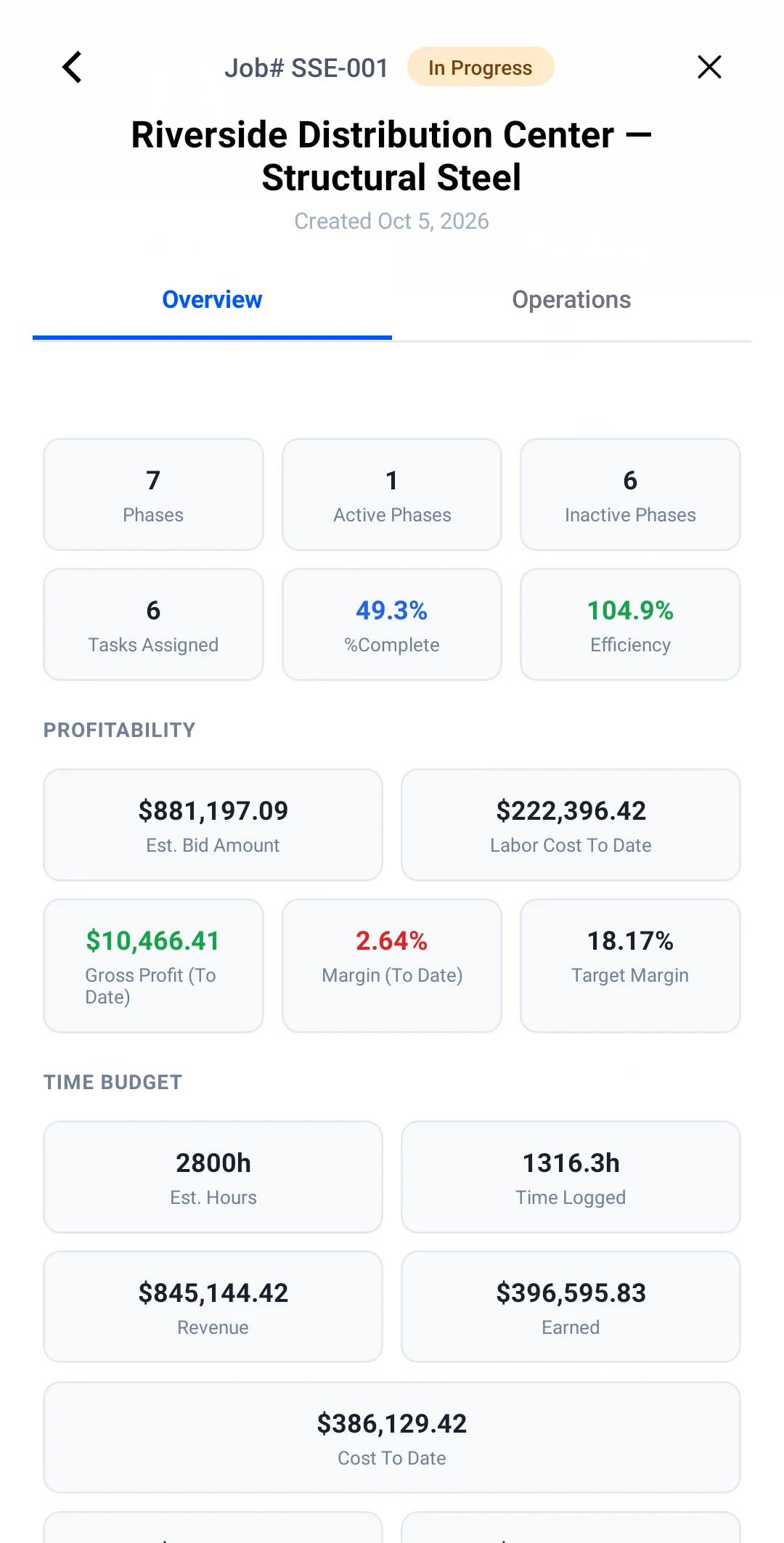
Job detail — Worker Efficiency Android app -
The dashboard flags the slip
You don’t wait for closeout to find out — the dashboard flags a job whose projected profit is running under its target, and any job heading for a loss.
CEDAR HOSPITAL · UNDER TARGET $112,755.96The outlined part of the screen is shown again, larger. Needs attention — Worker Efficiency web app -
See which cost is running ahead
Open the flagged job’s financial report: budget vs. actual by cost type — labor, equipment, materials, subcontractor, fees. Margin to date can still look fine while a cost runs ahead of progress, so you catch it here and re-crew, re-sequence or bill the change while it still moves the number.
LABOR · SPENT vs BUDGET $85,770 of $1,032,000 · 6.80% completeThe outlined part of the screen is shown again, larger. Job financial report — web app -
Close it out clean
Safety forms and daily reports file straight from the jobsite — so the paperwork is already done when the job is.
AT CLOSEOUT forms already filed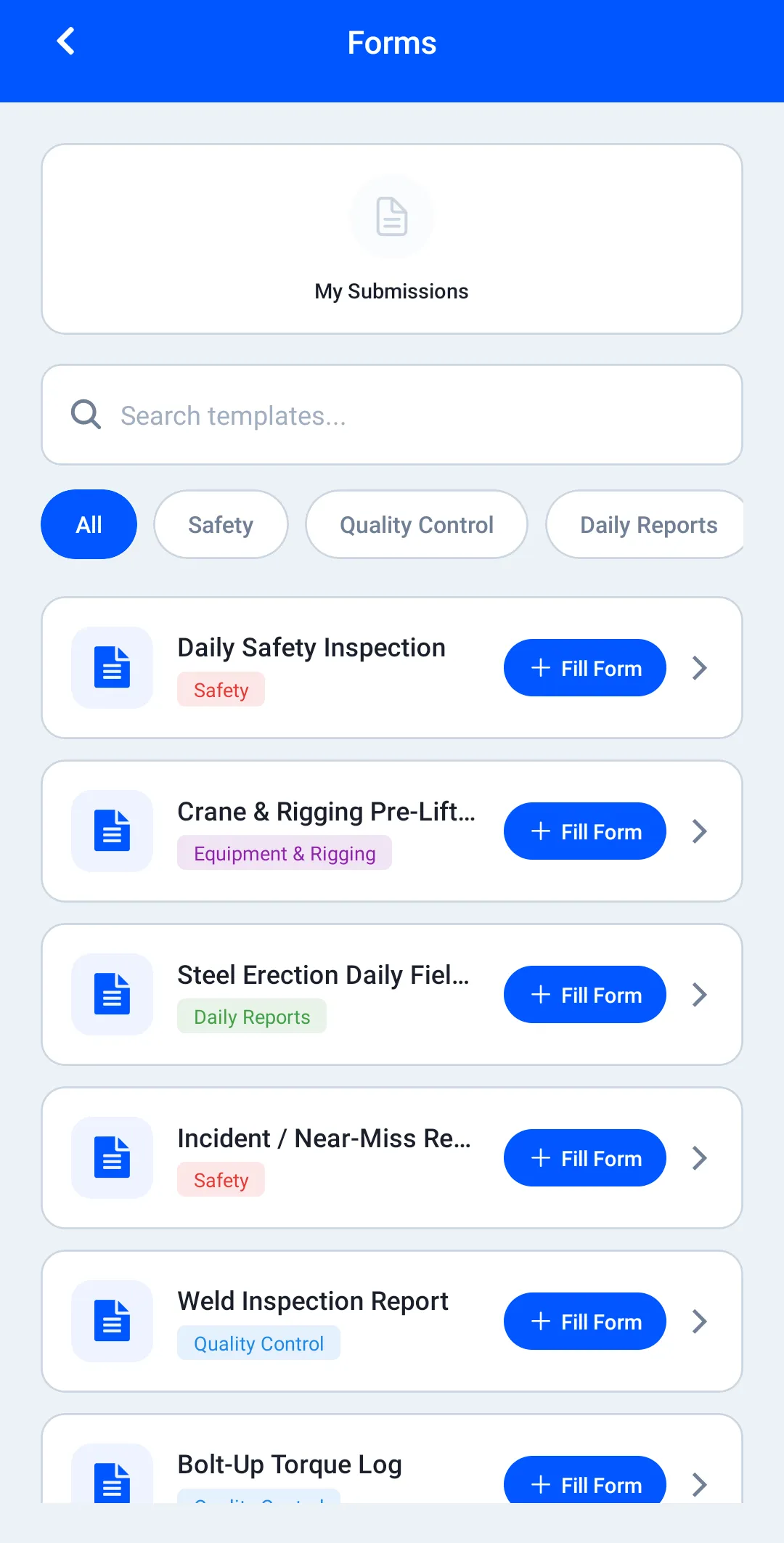
Job forms — Worker Efficiency Android app
02 — ALSO IN THE BOX
Time, money, reviews, certs, inventory — same login
Everything below runs on the same jobs and people as the ledger walk above. Each one gets its own page with the real screens.
FIELD OPERATIONS
Clock in, file the form, check the tool out
GPS timesheets, safety forms and equipment check-in/out — one app for the whole jobsite day.
See itJOB PROFITABILITY
Read the margin while the job is open
The live P&L for every job — materials and hard costs, change orders, and the company-wide money view — updated at every clock-out.
See itINVENTORY
One price list, dropped into every bid
Save a material once — cost, unit, markup — and every estimate after pulls it off the list instead of re-typing.
See itPEER REVIEWS
Rate the day on the phone, not an HR form
Skill, behavior and productivity ratings from the crew, filed on the phone at the end of a shift — so you know who to put on the next job.
See itTRAINING & CERTS
Prove the certs when the inspector asks
OSHA and trade courses tracked per worker, so the certs are provable when it matters.
See itQuestions owners ask
How long does setup take?
Three steps: create the company, invite the crew by email, make a job. Your first margin number shows up once the first shift is clocked against it and progress is logged.
Does it export to payroll or QuickBooks?
Works with QuickBooks through file export and import (CSV/Excel). No live sync yet. Timesheets export from Reports as a payroll CSV — regular, overtime, double-time, worked and break hours per worker and day by day, plus hours by job — for a person, a crew or a job. Job financial reports export to Excel and PDF.
See your own job in it by Friday.
Three steps: invite the crew by email, make a job, clock the first shift. The margin number does the convincing.