
// Job costing software for contractors
See every job's margin while it's still running.
One job at Summit Steel Erectors, followed from the bid to the profit card on its job header — and that number moves every time a crew clocks out, not at closeout. Chapter 1 opens on a line from a second Summit estimate; Chapter 6 widens to the whole company.
Summit Steel Erectors is our demo company, filled with sample data. Every screen below is captured from the real Worker Efficiency app — real product, real formulas, every total, margin and projection worked out by the app itself, right down to the jobs flagged for a look in Chapter 6.
01 — Chapter 1 · Bid it
Price the work with the number you actually know
Bill rate, lump sum, markup or margin — type whichever one you have in your head and the estimate solves for the other three.
You do Type one number. The app does the other three.
Here is one line of a Summit Steel bid: connection detailing & shop drawings, 192 hours of labour that cost you $18,247.68. You know what you want on top of cost — 15% — so you type 15 into What you add on top of your cost. $18,247.68 of cost plus 15% is the $20,984.83 you quote. and everything else fills itself in: a $109.30 What you charge the client for an hour of that trade — not what the hour costs you. On this line the app works it out as $109.30 an hour., a $20,984.83 price, $2,737.15 of profit, a 13.04% Profit as a share of the price you quote. $2,737.15 of profit on a $20,984.83 price is 13.04%..
Markup and margin are easy to mix up, and mixing them up is how a bid ends up thinner than you meant — so the app never makes you pick one: it prints both on the same line and spells out the arithmetic underneath — same deal, said two ways.
- Price a single line, or set one default markup for the whole bid and override only the lines that need it.
- Hand-priced lines stay hand-priced. The bulk panel says so out loud before it applies — here, 11 of 12 lines, with 1 hand-priced line it won't change.
- Nothing moves until you click Apply price — the panel is a calculator until you commit it.
Build the price list once — stop re-typing it into every bid
The beams, bolts and coatings you buy on every job live in one Inventory catalog — each with its cost, unit and markup saved once. Pull one into a bid and the line fills itself in, priced and ready to edit. See the catalog in full →
You do Save an item once. Pick it off the list on every bid after.
Save an item once — its unit, what it costs you per unit, and a What you add on top of your cost to get the price — the same idea as the 15% on the shop-drawings line above, where $18,247.68 of cost prices at $20,984.83. — and the form shows you the result before you save: what the item sells at, and the Profit as a share of the price you quote — on the line above, $2,737.15 of profit on a $20,984.83 price is 13.04%. that leaves you. Every bid after, you pick it off the list instead of re-typing it, and the line arrives priced — every field still editable on the spot.
It is the same list behind a whole trade's short-order materials — on Summit's catalog, expansion anchors, embed plates, ladder rungs, galvanizing touch-up paint, roof and composite deck — each able to carry a Your accounting or CSI code for the item, e.g. 05 12 00 for structural steel — carried from the catalog onto the bid line so the number matches your books. and a preferred vendor, so what lands on the bid is coded the way your accounting already knows it.
- Already keep your materials in a spreadsheet? Import the whole list — paste it or upload a CSV or XLSX, map the columns, preview, commit.
- Custom fields live on the item — grade, finish, anything you track — so the catalog carries the spec, not just a price.
- Every pulled-in line is stamped with the catalog item it came from, so the bid remembers where its prices came from.
02 — Chapter 2 · Win it
One click turns the estimate into the job that keeps score
Convert copies the bid into a live job: labour sections become phases, everything else becomes budgets, and the margin you bid becomes the target you are measured against.
You do Approve the estimate, press Convert to job. Once.
Riverside Distribution Center — Structural Steel, for Riverside Logistics LLC in Portland, OR: $721,053 of direct cost and $845,144 of What the job is measured against once it is live: direct cost plus markup, before contingency, tax or discount. Riverside: $845,144., with the bid priced to an 18.2% margin. Convert carries that margin across as the job's The margin the job is measured against once it is live, carried over from the estimate. Riverside's estimate shows 18.2%; the job header in Chapter 5 shows the same target to two decimals, 18.17%. — the 18.17% you will see on the job header in Chapter 5.
The one click that turns an approved estimate into a live job carrying the same numbers. No re-typing, and nothing to reconcile later — the job reports against the exact bid you sent. carries the structure across, not just the total — and the estimate says how, right above its sections: sections with labour become A chunk of work you schedule crews and hours against. Estimate sections containing labour become phases on the job.; sections with only materials, equipment, subs or fees become A budget bucket on the job for money that is not labour — the budgets you see in Chapter 3. on the job's Materials & Hard Costs tab. Riverside's run Shop Drawings & Detailing ($39,475), Fabrication ($338,739, at an 18% section markup), Delivery & Staging ($31,687), Steel Erection ($338,514) and on down the page.
The tracker across the top is the app telling you what to do next, the whole way: create, add costs, set pricing, submit, approve, convert to job. Riverside's is fully ticked — this estimate has been converted to a job, with a View Job button beside it. From here the phases start filling with hours from the shifts your crew clocks in the field, and every other dollar lands on the tab in Chapter 3.

03 — Chapter 3 · Track every dollar
Every cost that isn't labour, logged against its budget
Materials, subs, equipment and fees each land in a cost group with its own budget — with ordered and received on every line, and what is still outstanding wherever a delivery is due, so what you ordered is never confused with what has arrived.
You do Log the cost once, on the job. The budget updates itself.
Open the tab and the job's non-labour money is laid out by A budget bucket on the job for money that is not labour. Each one carries its own budget, split by cost type — the rooftop screen wall group: $7,400.00 of material and $1,200.00 of equipment., each with its own budget. The rooftop screen wall group's $7,400.00 of material and $1,200.00 of equipment match CO-001's line costs in Chapter 4, and the third group down, Added during the job, catches what nobody budgeted for: a $0.00 budget against $158,270.00 ordered.
Each group shows what has been What you have committed to buy. Anchor bolts & base plates: $6,420.00 ordered against a $5,700.00 budget., what has actually been What has actually shown up. Of that $6,420.00 ordered, $5,670.00 has been received., and, on any line still waiting on a delivery, what is still Ordered but not yet received. The third-party weld inspection on the base plates: $1,500.00 ordered, $750.00 received, $750.00 still outstanding.. Three different questions, three different answers — and a fourth on every line: whether you've paid it.
When a group runs past its budget, the header says so in red: +$1,180.00 over on the rooftop screen wall, +$720.00 on the anchor bolts and base plates.
The bar under a line is delivery, not payment: the weld inspection's sits half full in blue while everything that has fully arrived runs green, paid or not. Vendors sit on the line too — Fastenal, ALL Crane Rental, Infra-Metals, Portland Bolt, Apex NDT, Airgas — so "who do I chase" is answered on the same screen as "what did it cost".
No budget for it? It tells you before you save.
Logging a cost does the arithmetic while you type. Here a material entry for additional wide-flange beams — a spec revision — is pointed at the Added during the job bucket, and before anything is saved the dialog says it plainly: "This group has no material budget — this cost will be tracked as unbudgeted spend."
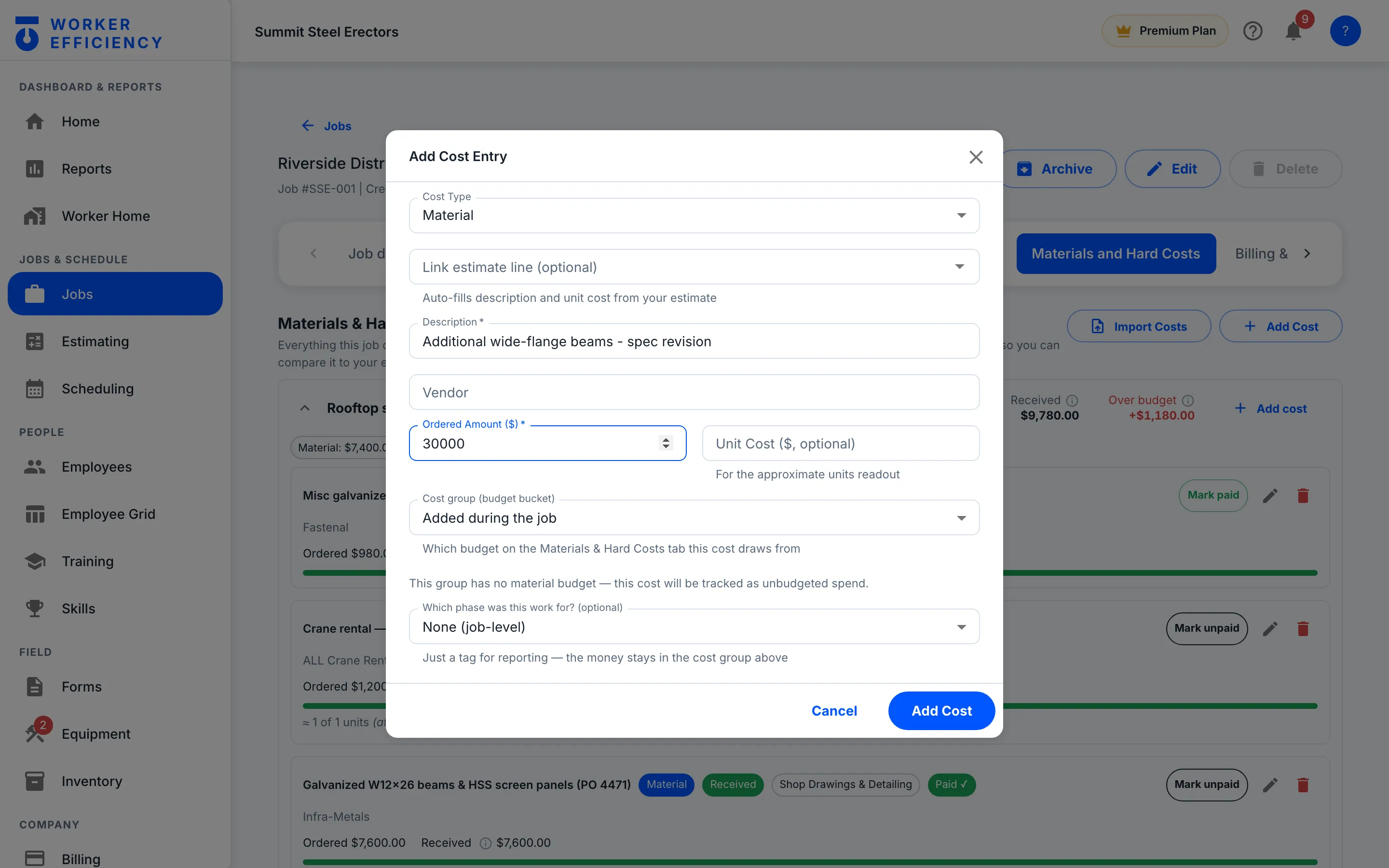
That is the whole philosophy in one dialog: tell you, never block. Point the same entry at a group that has a budget and a meter shows where it lands instead; push it past the budget and the app names the overage in its own words — "You can still log it — budgets track, they don't block." The cost was real; pretending otherwise would only make the ledger wrong. What you get instead is the number, the label on it, and a decision you make with your eyes open.
04 — Chapter 4 · Bill the scope change
Approved changes grow the contract by exactly what you priced
Price the extra work like a small estimate, submit it, approve it — and the contract, the budgets and the task list all move together.
You do Price the extra work. Approve it. Stop arguing from memory.
After the contract was signed, Owner RFI 14 asked for HSS screen-wall framing and galvanized panels around the rooftop mechanical units. It was priced as a Work added after the contract was signed, priced like a small estimate. In the app's own words: approved changes update the contract and budgets automatically.: 48 hours of field labour, the materials and a day of equipment — $11,576.00 of cost, priced at $14,202.00, itemised on the row you can expand.
Approve it and the job's What the client has agreed to pay, approved change orders included and pending ones left out. Riverside's Approved card: $21,126 across 2 COs, already in the contract. grows by exactly that price — the row reads "Applied: contract +$14,202.00". CO-002, additional anchor bolts and thickened base plates, did the same for $6,924.00, and the Approved card totals the pair: $21,126 across 2 COs, already in the contract. The labour arrives as a real task with real hours, so the new work costs the job like everything else.
CO-003 — relocate the crane pick zone and add a rigging crew day, $4,426.00 — is sitting in Submitted, "Waiting 9 days", with Approve, Reject and Revise right there; the Pending card keeps its $4,426 out of the contract until somebody decides. The no is on record too: CO-006, upgrading exposed connections to Architecturally exposed structural steel — steel left visible in the finished building, so it is detailed and finished to a higher standard, and costs more. at $23,200.00, reads Rejected with the client's reason beside it — over budget, deferred to a future phase. Unapproved scope having a price and a status is exactly what you want on screen when the conversation about who pays for it starts.
Expanded, it's just lines and prices
Field labour: 48 hr, $2,976.00 of cost priced at $3,512.00. Materials: 1 lump sum, $7,400.00 priced at $9,250.00. Equipment: 1 day, $1,200.00 priced at $1,440.00. Section subtotal: $11,576.00 of cost, $14,202.00 of price. The same detail you priced is the detail the job costs against — and the RFI's photos or PDFs attach right on the change order.
05 — Chapter 5 · Read the live margin
Margin you're getting, beside the margin you bid
One header answers how the job is doing in three numbers — profit to date against the margin you bid, budget spent against work done, and the contract with what has been earned of it.
You do Open the job. Read two numbers. Decide.
Riverside is running a 2.6% margin against the 18.17% The margin the job was bid at, carried over from the estimate. Riverside's estimate showed 18.2%; the job carries it as 18.17%, and that is the bar it is measured against. it was bid at — $10,466 of Revenue earned so far minus everything the job has cost so far — labour, materials, equipment, subs and fees. Riverside: $10,466, which is 2.6% of the $396,596 earned., 49% of the way through.
Behind that one comparison: 49.3% How much of the work is done, weighted by each task's hours and reported by the crew at clock-out — not straight-lined off the calendar., 1,316.3 of 2,800 estimated hours logged, $396,596 of Revenue recognised by progress: each task's revenue multiplied by how complete it is, added up. Riverside has earned $396,596 so far., and $386,129 spent against a $699,720 budget. That last pair is the warning: 55% of the budget is gone at 49% done, so the header flags it The app projects what the job will cost by the finish from how much of it is done. Riverside has used 55% of its budget with 49% of the work done — on that pace it finishes over budget, so it is flagged now, while there is half a job left to steer. — spending faster than the job is progressing.
The hours look on track: 47% of the estimated time used for 49.3% of the work, an efficiency of 104.9%. So the next place to look is the money side — Chapter 3's cost groups, including the bucket with no budget.
That is sample data, not a typical result — and it is exactly the moment this header exists for. The number is there at the halfway point instead of at the closeout autopsy, and it moves every time a crew clocks out. The colour is doing honest work too: green at or above your target, amber below it — as Riverside's is — and red once gross profit goes negative.
Read it beside Chapter 3. Gross profit to date nets every cost the job has logged — labour plus the materials, equipment, subs and fees on the Materials & Hard Costs tab — so a group running hot there shows up here too, while the tab tells you which one.
06 — Chapter 6 · See the whole company
The whole company on one page — losses in red
Cash, projected profit at completion against your target, and the jobs that need a look — worst first, losses in red.
You do Look once a week. Check cash, check the projection against target, then work the jobs-at-risk list.
This is Summit's home screen, and the Company Overview opens on cash: $450,000 The app's own definition: the money in the bank right now, before any bills you owe. Payables are not tracked, so treat it as gross cash, not spendable cash., $489,355 billed but not yet collected, $88,213 of Money the customer holds back on each payment until the job is finished and accepted. You have earned it, but cannot collect it yet. held, and 55 days to get paid — in red, with the oldest bill 22d out. Every number ties to its detail screen.
The profit you are projected to make if the work finishes the way it is trending right now — not just the profit booked so far. Cautious is the worst-realistic read, optimistic the best; reality usually lands between the two. is the honest version of a forecast. Here that is $1,173,044 on the cautious read and $1,395,892 on the optimistic one, against a $1,482,263 target — and the card does not soften the gap: cautious vs target reads −$309,218, in red. It will not fake a trend either: there is no prior week to compare yet, so it says so.
The Jobs at Risk card lists 2 jobs that The app's own definition: active jobs whose projected profit, budget or billing needs a look — worst first., worst first. Midtown Parking Structure — Erection is 30% complete with a projected loss of $31,140.62 (the card's −$31K, in red). Riverside, the job from Chapters 2–5, is on the list even though it still projects a profit: 49% complete, $55,485.04 projected against a $153,562.74 target. The Needs attention tab beside Overview goes wider — money risks and scheduling problems in one ranked feed.
Under those, three more cards finish the picture: Labor Now (who is on the clock, and who is running into overtime), Billing Position — $186,227 The app's own definition: work you have done but not invoiced yet — cash you are owed but have not asked for. — and Backlog & Pipeline, with $9,015,002 of The app's own definition: the dollar value of work you have signed but not yet done — your booked future revenue. signed and not yet built.
Job costing, in plain language
What does "job costing" actually mean here?
It answers one question continuously: is this job making the money you bid it to make? Your estimate sets the target margin. As crews clock hours and costs get logged, the job compares what it has earned against what it has cost — while the job is still running, not after closeout.
Where do the numbers come from — do I have to type them twice?
No. Labor comes from the shifts your crew already clocks, priced at each worker's rate. Percent complete comes from the crew at clock-out, weighted by each task's hours. Materials, subs, equipment and fees are logged once on the job's Materials & Hard Costs tab. The estimate supplies the budgets. Nothing is retyped from one screen into another.
Does the job's gross profit include materials?
Yes. Gross Profit (to date) on the job header is the revenue earned so far minus everything the job has cost so far — labour from the shifts your crew clocks, plus every material, equipment, sub and fee cost logged on the Materials & Hard Costs tab. On Riverside it reads $10,466, a 2.6% margin, with $396,596 earned to date. The Materials & Hard Costs tab still breaks the non-labour side out group by group — budget, ordered, received, over budget — so you can see which bucket is running hot.
Is 2.6% what I should expect?
No — it is not a typical result, and it is not a real job. Summit Steel Erectors is our demo company, filled with sample data, and its Riverside job happens to show exactly the case the job header exists for: bid at an 18.17% target, running 2.6% at 49% done, flagged Over pace. Margin runs both ways. Your accounting tells you this after the costs post; this tells you at clock-out, with half the job still ahead of you. The colour is the honest part: green at or above your target, amber below it, red once gross profit goes negative.
What happens when the scope changes after the contract is signed?
You price the extra work as a change order — labor, material and equipment lines, same as a small estimate. Once it is approved the contract grows by exactly that price, the budgets follow, and the labour arrives as a real task with real hours so it costs the job like everything else. Riverside: CO-001 ($14,202.00) and CO-002 ($6,924.00) are approved and applied; CO-003 ($4,426.00) is still waiting on a decision, and stays out of the contract until it gets one.
How is this different from job costing in QuickBooks?
Accounting is backward-looking: it tells you what the job did once the costs post. This prices every clocked hour as it happens and every logged cost the moment it is committed, so you see the trend while you can still change crews, re-sequence work, or have the change-order conversation. Accounting still closes the books; this is what you steer with in between. Works with QuickBooks through file export and import (CSV/Excel). No live sync yet.
// THE REST OF THE APP
Everything else in Worker Efficiency
It's one app. Each part below uses the same jobs, crew and hours, so nothing gets typed twice.
KNOW YOUR MONEY
- Estimating Build the bid line by line, then convert it to the job
- Job Costing You're here Bid it, track it, read the live margin
- Scheduling & Change Orders Put the crew on the board; bill the scope that grows
- Inventory One reusable price list, dropped into any bid
- Field Operations Time, forms, equipment, estimates
How it works: one job, start to finish → Tour the app on real screens →
Your margin, live, from the first clock-out.
Make one job, invite the crew, clock the first shift — the first real margin number shows up the same day.